
Hands-On Review
Panasonic Toughbook 40 MK3 Review

The Bottom Line
The benchmark fully rugged laptop gets the newest silicon and real AI hardware without breaking compatibility with a single accessory. Exactly the upgrade its buyers wanted.
The Rugged Books Difference
Every unit is inspected, repaired & graded in-house.We don’t flip boxes. Each laptop is stripped, tested, and certified by our techs before it ships — so the review you’re reading reflects the exact machine you’ll receive.
Pros & Cons
- Up to 24 hours of battery life
- 1200-nit glove- & rain-capable touchscreen
- 8GB dedicated GPU in a rugged laptop
- Heavy and thick (~7.4 lb, over 2 inches closed)
- Very similar to MK2
Panasonic Toughbook 40 MK3 Review Specs
| Type | Fully rugged |
|---|---|
| Processor | Ultra 5 or Ultra 7 Intel AI Boost MPU |
| Graphics | Intel Arc, optional AMD Radeon Pro W7500M 8GB GDDR6 |
| AI performance | Up to 97 peak platform TOPS; dGPU adds up to 34.5 TOPS |
| Memory | Up to 64GB DDR5 |
| Storage | Quick-release OPAL NVMe SSD (up to 2TB) + optional 2nd SSD xPAK; FIPS option |
| Display | 14.0" FHD 1920x1080 |
| Sunlight Readable | Up to 1200 nits |
| Touch | 10-pt gloved/rain multi-touch, with stylus |
| Battery | Hot-swappable; up to 12 hrs single / 24 hrs dual |
| Ports (xPAK) | True serial, VGA, 2nd LAN, 2nd HDMI, barcode reader, smart card, fingerprint, HF-RFID, optical drive |
| Ports (std) | Thunderbolt 4 USB-C, 2x USB-A, HDMI, GbE LAN, microSD, headset, SIM |
| Wireless | Wi-Fi 7, Bluetooth 5.4, optional 4G/5G (SIM + eSIM, private 5G support), optional u-blox |
| GPS | Camera / audio5MP IR webcam w/ privacy shutter (Windows Hello), 4 mics w/ AI noise reduction, 95dB speakers |
| Ruggedness | IP66, MIL-STD-810H, MIL-STD-461G, 6-ft (180 cm) drop |
| Operating temp-29°C to +63°C | |
| Weight | ~7.4 lb (3.4 kg) with battery and handle |
| OS | Windows 11 Pro (Secured-core PC); Red Hat Enterprise Linux 10 certified |
| Security | TPM 2.0, OPAL SSD standard, concealed mode, optional fingerprint/smart card, Kensington slot |
The Panasonic Toughbook 40 MK3 is the newest version of Panasonic's flagship fully rugged laptop, launched in 2026. It keeps everything that made the Toughbook 40 the benchmark in its class: the IP66 sealing, the 6-foot drop rating, the modular xPAK system. Then it swaps in Intel's newest Core Ultra processors, a much stronger AI engine, and the first 8GB dedicated GPU ever offered in a rugged laptop.
What's New
| MK2 (2024) | MK3 (2026) | |
|---|---|---|
| Processor | Core Ultra 5 135H / Ultra 7 165H vPro | Core Ultra 5 235H / Ultra 7 265H vPro |
| AI (NPU) | First Toughbook NPU | Up to 97 platform TOPS |
| Dedicated GPU option | AMD Radeon PRO W6300M | AMD Radeon Pro W7500M 8GB, first 8GB dGPU in rugged |
| Security baseline | Windows 11 Pro | Windows 11 Pro Secured-core PC |
| Linux | Not certified | Red Hat Enterprise Linux 10 certified |
| Bluetooth | 5.3 | 5.4 |
| Chassis / display / ruggedness | Identical | Identical |
| xPAKs, docks, batteries | Shared ecosystem | Fully compatible with MK2 ecosystem |
Here's the short version: the chassis didn't change, and that's a feature, not laziness. The MK3 is the same tank as the MK2 on the outside, with a serious brain upgrade on the inside. If you already run Toughbook 40s, everything you own carries straight over: docks, xPAKs, batteries, vehicle mounts, all of it.
We refurbish, sell, and service Toughbooks every day, and we've already covered the Toughbook 40 MK2 in a full review. This one focuses on the whole machine, plus a clear breakdown of exactly what changed with the MK3.
What is the Toughbook 40?
The Toughbook 40 is Panasonic's top-of-the-line 14-inch fully rugged laptop, the modern successor to the legendary CF-31. It's the machine you buy when "semi-rugged" isn't enough: defence, police, utilities, mining, field engineering, anywhere the laptop gets rained on, dropped from standing height, and used with gloves at -25°C.
Two things define it. First, it's genuinely fully rugged: IP66 sealed against dust and powerful water jets, tested to MIL-STD-810H, rated for 6-foot drops, and built to run from -29°C to +63°C. Second, it's the most modular laptop on the market. Eight areas are user-replaceable (battery, RAM, storage, keyboard, and four xPAK expansion bays), which adds up to more than 10,000 possible configurations. You can slide in a barcode scanner, a Blu-ray drive, a smart card reader, a fingerprint reader, a second battery, a second SSD, or legacy ports like true serial and VGA. And "user-replaceable" means exactly that: most xPAKs swap in the field with a few screws or none at all.

The trade-off is the same as it's always been. This is a 7.4-pound, two-inch-thick brick with a briefcase handle. Nobody buys a Toughbook 40 for the commute to a coffee shop. You buy it because it keeps working when everything else quits.
What's new in the MK3 vs the MK2
Panasonic doesn't do dramatic redesigns mid-generation. It does marks. The MK3 is a platform refresh, and the changes are all under the hood:
- New processors. The MK2's Intel Core Ultra 5 135H and Ultra 7 165H (Series 1) step up to the Core Ultra 5 235H and Ultra 7 265H (Series 2), both with Intel vPro. You get faster cores, better efficiency, and more headroom for heavy multitasking.
- A much bigger AI engine. The MK2 was the first Toughbook with a dedicated NPU. The MK3's new platform multiplies that AI horsepower, with Panasonic quoting up to 97 peak platform TOPS. In plain terms: on-device transcription, image recognition, mapping assistance, and AI noise filtering run locally, fast, without needing a cloud connection. For teams working where there is no signal, that's the whole point.
- The industry's first 8GB dedicated GPU in a rugged laptop. The MK2 offered an optional AMD Radeon PRO W6300M. The MK3 upgrades that option to the Radeon Pro W7500M with 8GB of GDDR6, a big jump for 3D mapping, CAD, simulation, and GIS rendering in the field.
- Secured-core PC out of the box. The MK3 ships as a Windows 11 Pro Secured-core PC, which means firmware-level protection is on by default. That's a growing procurement requirement for government and critical-infrastructure buyers.
- Official Linux support. The MK3 is certified for Red Hat Enterprise Linux 10. That's a quiet change that matters a lot to defence and industrial integrators who don't run Windows.
- Newer wireless. Bluetooth moves to 5.4 alongside Wi-Fi 7, with optional 4G/5G (physical SIM + eSIM) and optional u-blox dedicated GPS.
- Shared platform with the Toughbook 56. The MK3 runs the same internal platform as Panasonic's new semi-rugged Toughbook 56. For fleet managers, that means one image, one driver set, and simpler IT across a mixed rugged fleet.
What didn't change: the chassis, the display, the ruggedness ratings, the battery system, and the xPAK ecosystem. Every accessory, dock, and expansion module from the MK2 fits the MK3. Panasonic calls this a modular-first philosophy; we call it protecting your investment. Either way, it's the right move.
Build and modularity: still the most configurable laptop made
The Toughbook 40's magnesium-alloy chassis is wrapped in corner bumpers, with latched covers over every port. The handle pulls out from under the palm rest and you carry it like a toolbox, which is honest, because that's what it is.
The xPAK system remains the Toughbook 40's signature trick. Four expansion areas (left, right, palm rest, and rear) accept modules that most laptops would need a whole different SKU for. On the bench, we love this machine for the same reason fleet buyers do: the battery, RAM, SSDs, and even the keyboard come out without drama. The main SSD is quick-release, so a drive can be pulled and locked in a safe in seconds. When a device is this serviceable, it stays in service for a very long time, and it refurbishes beautifully.
Display: 1200 nits, gloves, and rain
The 14-inch Full HD touchscreen runs up to 1200 nits, bright enough to stay fully readable in direct sunlight without cupping your hand over the screen. It's a 10-point capacitive panel with glove mode and rain mode, so it keeps tracking your finger accurately with work gloves on or with water sitting on the glass. A stylus and screen film are included on most configurations.

No 4K, no OLED, and that's correct for this machine. FHD keeps battery draw sane and text perfectly sharp at 14 inches, and brightness is worth more than resolution when the sun is your office lighting.
Performance: the AI angle, explained without the buzzwords
Both MK3 chips are 16-core processors that split work across three engines: performance cores for heavy tasks, efficiency cores for background work, and the NPU for AI tasks. The machine decides which engine fits the job, which is why demanding software runs fast while battery life stays reasonable.

Do you need the AI hardware? If your software today is dispatch, diagnostics, and Office, then no, and the MK3 will simply feel very fast. But field software is moving quickly: speech-to-text report writing, automatic photo tagging on inspections, on-device translation, real-time noise removal on calls from loud environments. All of that runs on the NPU without touching the internet. Buying the MK3 is less about what you run today and more about not replacing the fleet when your software vendor ships those features next year.
The optional Radeon Pro W7500M 8GB turns this into a legitimate mobile workstation for 3D terrain mapping, CAD, and simulation work. Most buyers won't need it. The ones who do (GIS teams, defence, engineering) have never had this much GPU in a fully rugged chassis before.
Memory goes to 64GB of DDR5 across two accessible slots, and storage stacks up through the quick-release OPAL self-encrypting main SSD plus a second SSD xPAK. FIPS-encrypted drives are available for federal requirements.
Battery life: up to 24 hours with hot-swap
A single battery is rated for up to 12 hours; add the second-battery xPAK and Panasonic rates it up to 24. Both batteries hot-swap. Pull one and click in a fresh one without shutting down. Panasonic's battery management software monitors cell health and adjusts charging to stretch lifespan, which we can confirm matters: the batteries coming out of well-managed Toughbook fleets test noticeably healthier than average.

Real-world numbers depend on your config. Crank the 1200-nit screen outdoors with the dGPU working and you'll land well under the rating, like any laptop. But for typical field duty cycles, two batteries genuinely covers a long shift with room to spare.
Ports and connectivity
Standard: Thunderbolt 4 USB-C, two USB-A, HDMI, gigabit Ethernet, microSD, headset jack, and SIM (physical + eSIM on cellular configs). Through xPAKs you can add true RS-232 serial, VGA, a second LAN port, a second HDMI, and more. Those are the legacy ports that industrial and military equipment still demands, available without dongles.
Wireless is Wi-Fi 7 with Bluetooth 5.4, optional 4G LTE or 5G with support for private and standalone 5G networks, and optional dedicated GPS. Panasonic designs its antennas in-house, and it shows in fringe-coverage areas. The webcam is a 5MP infrared unit with a physical privacy shutter and Windows Hello face login, backed by four microphones with AI noise reduction and speakers rated at 95dB, loud enough to hear navigation over a running engine.
How rugged is it?
- IP66: completely sealed against dust, and protected against powerful water jets. Not just rain-resistant. Hose-it-off rugged.
- Drops: rated for 6-foot drops (180 cm), tested to MIL-STD-810H. That's a fall from standing carry height onto hard ground.
- Temperature: operates from -29°C to +63°C. Canadian winters and desert summers, same machine.
- MIL-STD-461G: tested for electromagnetic interference resistance, a requirement for defence and a real benefit around heavy electrical equipment.
- Extras built for the job: one-touch concealed mode kills the display, lights, and radios instantly for tactical work, and a Tactical configuration with military circular connectors is available for vehicle and comms integration.
This is a different category from semi-rugged machines like the Toughbook 55 or Dell's Latitude 5430. Those handle rain and 3-foot drops. The Toughbook 40 handles water jets and 6-foot drops. If you're not sure which category you need, the honest test is simple: does the laptop ever get wet on purpose, or dropped from standing height? If yes, this is your category.

MK3 vs MK2 vs MK1: which should you buy?
- Buy the MK3 if you're deploying new fleets for a 5 to 7 year service life, your software roadmap includes AI features, you need Secured-core or RHEL 10 certification, or your workload wants the 8GB dGPU. It's the longest runway.
- Buy the MK2 if you want the modern Core Ultra platform, NPU included, at a lower price now that the MK3 is out. For most field work today, the MK2's performance is more than enough, and it shares every accessory with the MK3.
- Buy a refurbished MK1 if budget leads the decision. The 11th-gen Intel chips still handle standard field software fine, the chassis and ruggedness are identical, and refurbished pricing is a fraction of new. Fresh batteries and a tested unit close most of the practical gap.

All three marks share the same body, docks, and xPAK ecosystem, so a mixed fleet isn't a compromise. It's a strategy.
The verdict
The Toughbook 40 MK3 doesn't reinvent anything, and that's exactly what its buyers want. Panasonic took the most rugged, most modular laptop in the category and gave it the newest processors, real AI hardware, an unprecedented GPU option, and the security certifications that procurement teams now demand, all without breaking compatibility with a single dock, battery, or xPAK. That discipline is rare, and it's worth paying for.
It's heavy, it's thick, and configured with the dGPU it costs serious money. It's supposed to. This is a purpose-built tool, and in its category of fully rugged 14-inch laptops, it's the machine everything else gets measured against.
FAQ
What's the difference between the Toughbook 40 MK3 and MK2?
The MK3 upgrades to Intel Core Ultra Series 2 processors (Ultra 5 235H / Ultra 7 265H vPro) with much stronger AI performance, offers an 8GB AMD Radeon Pro W7500M dedicated GPU (up from the MK2's W6300M option), ships as a Windows 11 Secured-core PC, adds Red Hat Enterprise Linux 10 certification, and moves to Bluetooth 5.4. The chassis, display, ruggedness ratings, batteries, and xPAK modules are unchanged and fully compatible between the two.
Is the Toughbook 40 MK3 waterproof?
It's IP66 rated: completely sealed against dust and protected against powerful water jets from any direction. It handles heavy rain and hose-downs. It's not rated for submersion.
How long does the Toughbook 40 MK3 battery last?
Panasonic rates a single battery at up to 12 hours and dual batteries at up to 24 hours. Both are hot-swappable, so you can change a battery without shutting the machine down.
Do MK2 accessories and xPAKs work with the MK3?
Yes. The MK3 uses the same chassis and form factor as the MK2, so xPAK modules, batteries, docks, and vehicle mounts carry over.
What are xPAKs?
xPAKs are Panasonic's swappable expansion modules for the Toughbook 40's four expansion bays. Options include a barcode reader, smart card and fingerprint readers, DVD/Blu-ray drives, a second battery, a second SSD, and legacy ports like true serial, VGA, and a second LAN. Most can be installed by the user in the field.
Is the Toughbook 40 MK3 overkill compared to a Toughbook 55?
It depends on the environment. The Toughbook 55 is semi-rugged (IP53, 3-foot drops) and lighter, ideal for vehicle-based and mixed office/field work. The Toughbook 40 is fully rugged (IP66, 6-foot drops, MIL-STD-461G) for environments where the laptop takes direct water, hard drops, and extreme conditions routinely.
Ready to spec one out? We carry the Toughbook 40 line new with full Panasonic warranty, and refurbished units torn down, tested, and rebuilt in our Ontario facility. Shop our Panasonic Toughbook collection or call us to talk through MK1 vs MK2 vs MK3 for your fleet.
Final Thoughts
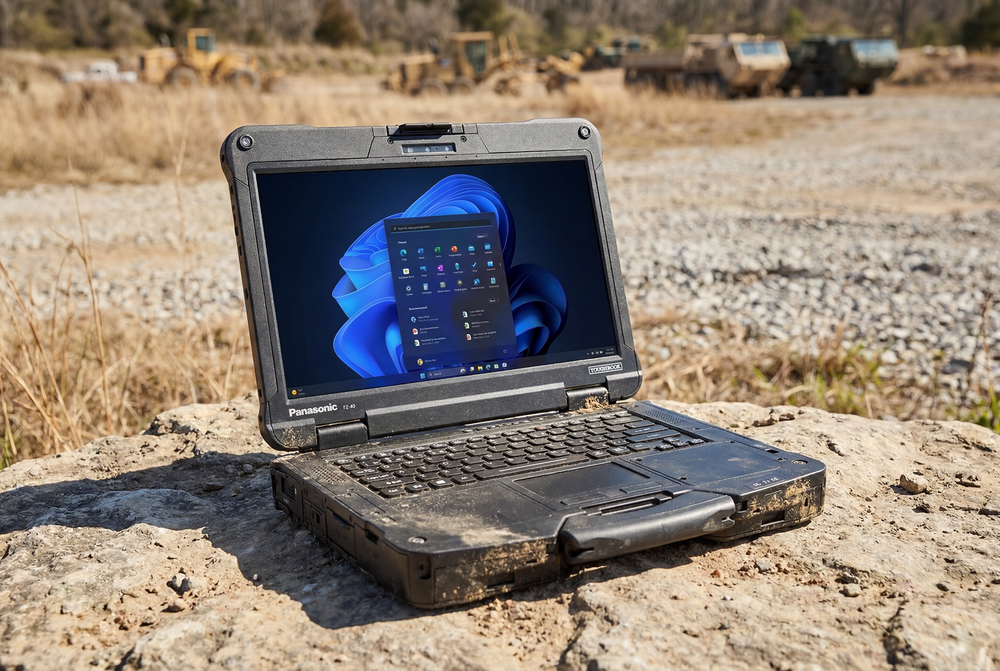
(Credit: The Rugged Books Media Team)
Panasonic Toughbook 40 MK3 Review
The benchmark fully rugged laptop gets the newest silicon and real AI hardware without breaking compatibility with a single accessory. Exactly the upgrade its buyers wanted.