
Hands-On Review
Panasonic TOUGHBOOK 56 Review

The Bottom Line
Featuring an updated Intel processor and dedicated graphics, this laptop is a major upgrade for semi-rugged tech. Panasonic continues to deliver durable, highly customizable machines built to last.
The Rugged Books Difference
Every unit is inspected, repaired & graded in-house.We don’t flip boxes. Each laptop is stripped, tested, and certified by our techs before it ships — so the review you’re reading reflects the exact machine you’ll receive.
How We Refurbish →Pros & Cons
- 6 user-replaceable areas and xPAK
- Up to 24 hours battery life
- Latest Intel Core Ultra CPUs
- MIL-STD-810H, IP53, and drop resistance
- High price
- Small touch pad
Panasonic TOUGHBOOK 56 Review Specs
| Operation System | Windows 11 Pro and Red Hat Enterprise Linux 10.1 |
|---|---|
| CPU | Intel Core Ultra 5 vPro Processor 235H (optional Ultra 7 265H) Featuring Intel AI Boost |
| Class | Rugged |
| Display | 14” |
| Resolution | 1920 by 1200 16:10 WUXGA (opt. 1000 nit gloved touch) |
| Battery | 12 hours (24 with optional 2nd battery) |
| Memory | 16 - 64 GB |
| Storage | 512GB - 2TB |
| Webcam | 5MP Infrared with Windows Hello support |
| Backlit Keyboard | Yes |
| Ports & Expansions | Thunderbolt™ 4 USB-C x2, Optional USB-C, USB-A (up to 2), Optional MicroSDXC, HDMI, Optional VGA, Ethernet (up to 3 & up to 10 Gbps), Optional True Serial, Audio In/Out, Dual SIM (4FF, eSIM), Docking Connector1, Optional DVD Drive, Optional Blu-ray Drive |
| Wireless | Wi-Fi 7, Bluetooth®, Optional GPS, Optional 5G (Sub6 + C-band) |
| Weight | 4.55 lbs (4.99 lbs Touch model) |
| Warranty | 3-year limited warranty, parts and labor |
| Testing | 3’ Drop, MIL-STD-810H, IP53 |
Key takeaways from our TOUGHBOOK 56 review
- The Toughbook 56 starts at $3,325 and runs Intel Core Ultra Series 2 processors with an optional 8GB AMD Radeon Pro GPU — the first semi-rugged laptop to offer that level of graphics power.
- Six modular areas give you 5,760 possible configurations through Panasonic's xPAK system, and you can swap most of them yourself without sending the machine in for service.
- Dual hot-swap batteries push runtime to 24 hours. The same 68Wh battery from the Toughbook 55 now lasts 20% longer thanks to the more efficient processor and redesigned motherboard.
- At 4.66 pounds with a retractable handle and a 36.3 mm profile, it's lighter and thinner than you'd expect for the level of protection you're getting.
Introduction
The Panasonic TOUGHBOOK brand has long stood as a historical pioneer in durable field computing, setting the standard for devices that must survive where standard consumer hardware simply fails.
At Rugged Books, we've spent years putting these machines through their paces, and we know firsthand what separates the real workhorses from the pretenders. The latest evolution in this lineage is the Panasonic TOUGHBOOK 56, which officially launched in May 2026 with a starting MSRP of $3,325. This 14-inch semi-rugged laptop runs Windows 11 Pro out of the box and maintains a highly portable profile, starting at a base weight of just 4.66 pounds.
In this Panasonic TOUGHBOOK 56 review, we will examine the technical specifications, performance benchmarks, and modular capabilities that define this new generation. By evaluating its processing power, battery life, and physical resilience, we aim to provide a thorough analysis of whether this device meets the rigorous demands of modern field professionals.
What's New in the Toughbook 56?
Panasonic didn't just swap in a faster processor and call it a day. The Toughbook 56 is a ground-up platform change. Here's what's different:
-
Intel Core Ultra (Series 2) Processors: A major upgrade from previous generations, featuring more cores, better efficiency, and built-in AI acceleration via a Neural Processing Unit (NPU).
-
Optional 8GB Dedicated GPU: This is the first semi-rugged laptop to offer a professional AMD Radeon Pro W7500M GPU, enabling AI, CAD, and heavy graphics workflows directly in the field.
-
AI-Ready Architecture: The system delivers up to ~97 TOPS of AI performance by combining the CPU, GPU, and NPU.
-
New 16:10 WUXGA Display: The transition from 16:9 provides more vertical screen space, improving productivity by requiring less scrolling for maps, reports, and data.
-
Wi-Fi 7 + Enhanced 5G Connectivity: Users gain faster wireless speeds and lower latency, with full support for modern enterprise and public safety networks, including FirstNet.
-
Expanded Modular System (xPAK Evolution): The device still supports modular bays but now includes faster 10Gbps Ethernet options, more flexible expansion combinations, and improved field reconfiguration.
-
Upgraded DDR5 Memory: Faster RAM compared to previous DDR4 systems translates to better multitasking and overall performance.
-
Improved Ergonomics (ErgoGrip Design): The main chassis features a retractable handle, a latch-free lid for one-hand opening, and better usability with gloves.
-
Longer Battery Life: The system supports up to 24 hours of continuous operation with dual batteries.
-
Enhanced Security: Designed with an enterprise and government focus, it includes an optional FIPS-encrypted SSD (an industry first in rugged devices) and advanced firmware protection via TOUGHBOOK Guard.
Design and Durability
Built Tough, but Not Overkill
The Toughbook 56 is semi-rugged. That means it's not the tank-like fully rugged Toughbook 40 it's built to survive the kind of abuse that happens in real work environments without being so heavy and bulky that you dread carrying it.
It carries a MIL-STD 810H rating, which covers drops, vibration, shock, extreme temperatures (-29°C to 60°C), and dust. The IP53 rating means it handles dust and water spray not submersion, but enough to keep working in rain or dusty job sites. Drop protection is rated at 91 cm (about 3 feet) across 26 drops onto plywood, tested by an independent lab.
The chassis is magnesium alloy with rubberized edges. It feels solid without feeling heavy. At 2.00 kg (4.66 lbs), it's actually lighter than the Toughbook 55 MK3's 2.08 kg starting weight. That doesn't sound like much on paper, but when you're carrying it between job sites all day, every gram matters.

Thoughtful design features for field professionals
Usability in harsh conditions requires specialized ergonomic engineering, and this is where Panasonic really listened to the people who use these machines daily.
Retractable Handle: Pull it out when you need it, tuck it away when you don't. The built-in retractable handle makes carrying effortless without getting in the way during vehicle mounting or desk work.

Fits Your Backpack: At just 36.3 mm thin with a compact footprint, the TOUGHBOOK 56 slides straight into any standard 20-30L backpack without taking up extra space.

Lighter Than You'd Think: At just 2.00 kg, the TOUGHBOOK 56 is lighter than most power tools you're already carrying, so it won't add to the strain of a long day on the job.

The device is built for the field and designed for you. The lightweight TOUGHBOOK 56 is loaded with ErgoGrip features that make long days less of a grind:
-
ErgoGrip Handle: Wide and textured so it stays firmly in your hand, reducing slipping and fatigue all day long
-
Latch-Free Screen: Flips open with one hand in seconds, even with gloves on
-
ErgoGrip Touchpad: Ignores accidental presses so you stay in control, gloves or no gloves
The magnesium alloy frame and rubberized edges provide resilient 3-foot drop protection, giving you the confidence to work without babying your equipment.
Performance
Processing Power
The Toughbook 56 is configurable with either the Intel Core Ultra 5 235H or the Intel Core Ultra 7 265H, both with vPro. The Ultra 7 brings 16 cores (6 performance, 8 efficiency, 2 low-power) running up to 5.3 GHz. For field applications — dispatching, fleet management, CAD, diagnostic software, report generation — this is more than enough.
The integrated NPU is the forward-looking part. It's dedicated hardware for AI inference, and it means the Toughbook 56 can handle machine learning tasks locally without needing a cloud connection. Right now, that's relevant for a subset of enterprise users. In two or three years, as more field applications integrate AI features, it'll be relevant to everyone.
If you need more graphics horsepower, the optional AMD Radeon Pro W7500M with 8GB GDDR6 handles CAD rendering, GIS visualization, and AI workloads that benefit from GPU acceleration. Just keep in mind the trade-offs: the dGPU model is heavier, can't use docks, and loses some modularity.
Memory and Storage
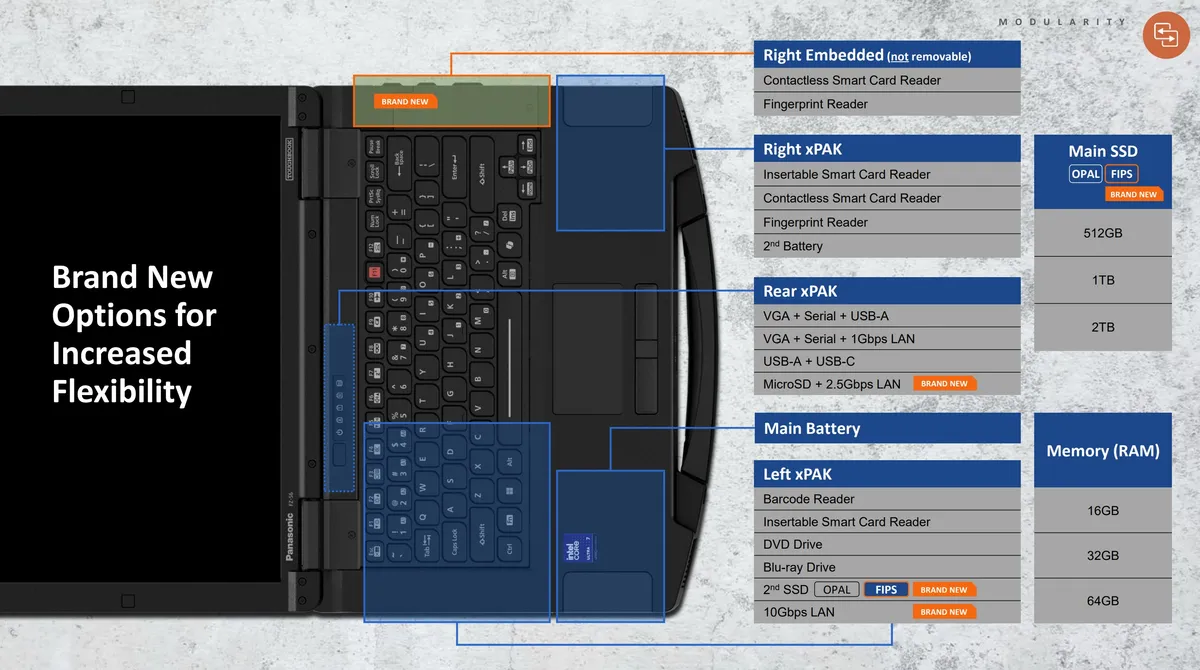
Two user-accessible DIMM slots supporting up to 64GB of DDR5. The main drive is an NVMe OPAL encrypted SSD, and you can add a secondary SSD through the left xPAK bay. The FIPS encrypted SSD option is available for organizations that need it.
The fact that the RAM is user-upgradeable not soldered to the board is worth highlighting. Most consumer laptops have moved to soldered memory. Being able to pop in more RAM yourself, in the field if necessary, is a practical advantage that saves time and money over the life of the device.
Modularity: The xPAK System
This is where the Toughbook line has always separated itself from everything else, and the Toughbook 56 takes it further.
Six user-replaceable areas across the chassis give you 5,760 possible configuration combinations. In practical terms, that means you can swap in an optical drive when you need one, pull it out and drop in an extra SSD when you don't. Need a barcode reader for warehouse inventory? That's an xPAK. Smart card or fingerprint authentication for government work? Also an xPAK. Extra battery for a long shift? Same thing.

The three main xPAK bays break down like this:
Left bay: Choose between a secondary SSD, a DVD or Blu-ray drive, or a 10Gb LAN.
Right bay: Fits an additional battery pack, contactless/insertable card reader or a fingerprint authentication module.
Rear bay: Accommodates a 2.5GbE Ethernet port or specialized I/O ports.
You make these swaps yourself — no tools, no depot service required. For organizations running mixed fleets where different teams need different configurations, this means you can buy one base model and customize it per role. That's a real cost advantage over buying purpose-built machines for every use case.
Panasonic also maintained backwards compatibility with most Toughbook 55 peripherals. Your existing vehicle docks, desk docks, chargers, and batteries work with the 56. That's a meaningful investment protection for organizations with large installed fleets.
Display
The 14-inch WUXGA (1920×1200) panel at 16:10 is a welcome upgrade. The base resolution on the Toughbook 55 was 1366×768 functional, but it felt dated in 2024 and felt ancient by 2026. The new panel shows more content with less scrolling, which is exactly what field workers need when they're pulling up maps, data tables, or long inspection forms.
Brightness goes up to 1,000 cd/m² readable in direct sunlight and down to 1 cd/m² for concealed mode in defense and tactical applications. The touch panel features Panasonic's updated Auto Mode, which automatically detects whether you're using bare fingers, gloves, or a stylus and adjusts accordingly. On the Toughbook 55, you had to switch modes manually. It's a small change, but in the field, small time savings add up.

Battery Life
This is one of the most impressive improvements. The Toughbook 56 gets 12 hours on a single battery and 24 hours with both batteries installed up from 10 and 20 hours respectively on the Toughbook 55 MK3. And Panasonic achieved this using the same 68Wh battery pack.
The longer runtime comes from the Core Ultra platform's better power efficiency combined with a redesigned motherboard. That means your existing battery inventory carries forward to the new machine, and each battery lasts longer per charge.
Both batteries are hot-swappable. You can pull one out and replace it while the other keeps the system running. For shift workers, field technicians, and anyone who can't afford downtime to recharge, this is the feature that justifies the Toughbook over a regular business laptop.

Connectivity
The Toughbook 56 covers every connectivity scenario you're likely to run into:
Wi-Fi 7 (Intel BE211) with faster throughput and lower latency than Wi-Fi 6E. The multi-link operation and 320 MHz channel support help in congested wireless environments like hospitals, warehouses, and large public venues.
5G Sub-6 with a 36% faster modem than the Toughbook 55. Supports 4G LTE, 5G (Sub-6, C-band), FirstNet (Band 14), Private Cellular CBRS (Band 48), and dual SIM (nano-SIM + eSIM).
Up to three simultaneous Ethernet ports, including a 10 Gbps option. No other rugged laptop offers this. If you're a network technician or you're working with systems that require high-bandwidth wired connections, this alone could be a reason to choose the Toughbook 56.
Bluetooth 5.4 Class 1 for extended-range peripheral connections.
Dedicated GPS (U-Blox M9N) for accurate positioning in fleet and asset tracking applications.
Standard ports include USB-C (Thunderbolt), USB-A, HDMI, and Ethernet, all behind protective covers.
Panasonic TOUGHBOOK 56: pros and cons
Evaluating this device requires weighing its specialized capabilities against its physical and financial footprint.
|
Advantages (Pros) |
Disadvantages (Cons) |
|---|---|
|
Exceptional Core Ultra performance with optional 8GB dGPU |
Premium pricing ranging from $3,325 to over $6,000 |
|
Unmatched modularity with the xPAK expansion system |
Noticeable bulk and weight compared to standard consumer laptops |
|
Future-proof connectivity including Wi-Fi 7 and 5G |
Display resolution is limited to WUXGA (1920×1200) |
|
Backward dock compatibility with previous generation mounts |
Certain dGPU configurations limit modularity and docking options |
|
Dual hot-swap battery system for 24-hour continuous runtime |
Only semi-rugged, lacking the extreme IP ratings of fully rugged models |
Is the Toughbook 56 Worth It?
That depends entirely on where and how you're using it.
If you're deploying laptops in environments where drops, dust, rain, extreme temperatures, and long shifts are the norm utilities, law enforcement, defense, field service, automotive testing the Toughbook 56 earns its price through lower failure rates, longer service life, and less downtime. A $3,325 Toughbook that lasts five years with minimal repairs will cost less over its lifetime than two or three consumer laptops that each fail within 18 months.
The xPAK system also saves money by letting you configure one base model for multiple roles instead of buying different machines for different teams. And backwards compatibility with existing 55-series docks and accessories means you're not starting from scratch on fleet infrastructure.
For organizations already running Toughbook 55 fleets, the upgrade is compelling if you need AI edge processing, Wi-Fi 7, 10GbE, or the improved display and battery life. If your current 55 MK3 units are meeting your needs and you're not planning new deployments, there's no urgency the 55 MK3 is still a capable machine.
At Rugged Books, we can help you figure out the right configuration for your operation and find the best value whether that's a new Toughbook 56 build or a refurbished Toughbook 55 MK3 that gets the job done at a lower cost.
Frequently asked questions about the TOUGHBOOK 56
Are Panasonic Toughbook any good?
Yes, they excel in durability, using high-grade materials like magnesium alloy and military-standard ratings specifically engineered for heavy industrial use. Their exceptionally low failure rates make them an industry standard for mission-critical operations.
What is the lifespan of a TOUGHBOOK?
A typical unit can easily exceed five years of active service in the field. This operational lifespan is significantly extended by backward compatibility with previous vehicle docks and the use of modular, user-replaceable components that allow for easy repairs.
How does the TOUGHBOOK 56 compare to fully rugged laptops?
The Toughbook 56 is classified as semi-rugged, trading extreme environmental defense for a lighter, thinner 36.3 mm chassis. It provides ample protection for most field workers while remaining highly portable compared to bulkier fully rugged laptops.
Can the TOUGHBOOK 56 be upgraded?
Yes, the system is highly upgradable thanks to its six user-accessible areas and modular xPAK expansions, allowing users to swap storage, memory, and ports. However, discrete GPU modules must be configured at the time of purchase and cannot be added later.
Does the Toughbook 56 have a dedicated GPU?
Yes. The Toughbook 56 offers an optional AMD Radeon Pro W7500M with 8GB GDDR6 — the first discrete GPU option in a semi-rugged laptop. The dGPU model adds weight and is not compatible with docking stations.
What is the biggest upgrade from the Toughbook 55 to the Toughbook 56?
The most impactful upgrades are the Intel Core Ultra processor with integrated NPU for edge AI, the move from DDR4 to DDR5 memory, Wi-Fi 7, the 16:10 WUXGA display replacing the dated 16:9 HD base panel, and 20% longer battery life with the same battery pack.
Can I still buy the Toughbook 55 MK3?
Yes. The Toughbook 55 MK3 remains available new through Panasonic and authorized resellers, and refurbished through certified resellers like Rugged Books.
Final Thoughts
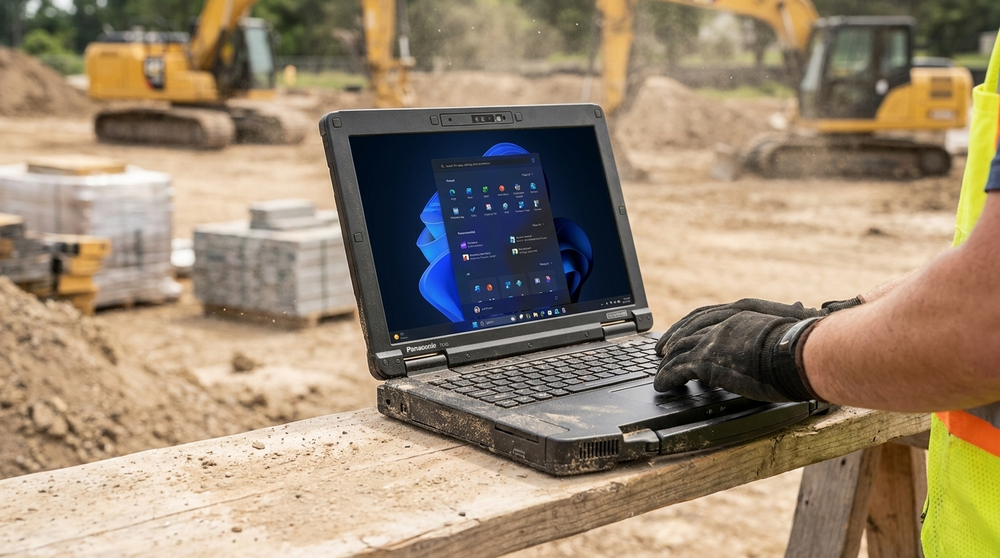
(Credit: By Rugged Books Media Team)
Panasonic TOUGHBOOK 56 Review
The transition to Intel's latest architecture and the inclusion of a dedicated GPU mark a significant milestone in semi-rugged computing. This device reiterates Panasonic's commitment to delivering durable, highly configurable, and long-lasting computing solutions that adapt to evolving technological demands. Whether you require advanced AI processing at the edge or simply a machine that will survive a drop onto concrete, this laptop delivers. For enterprises ready to upgrade their mobile workforce, exploring the available configurations through trusted distributors like Rugged Books puts your team in good hands with a tool engineered specifically for their operational reality.
Should I Upgrade?
The TOUGHBOOK 56 is more than a refresh—it’s a leap forward in AI-driven performance, battery life, and next-gen modularity.