
Hands-On Review
Panasonic Let's note FV4 Review

The Bottom Line
The Let's note FV4 is a 2.4 lb business laptop that trades raw speed for things procurement actually cares about: a 3:2 QHD screen, a port list that needs no dongles, a battery you can swap in twenty seconds, and secured-core plus TAA compliance. It is durable, not rugged, and the 41 to 95 F operating range is the line you cannot cross.
The Rugged Books Difference
Every unit is inspected, repaired & graded in-house.We don’t flip boxes. Each laptop is stripped, tested, and certified by our techs before it ships — so the review you’re reading reflects the exact machine you’ll receive.
Pros & Cons
- Genuinely light at 2.4 lb for a 14 inch machine
- 3:2 QHD screen shows far more of a document or spreadsheet than 16:9
- Best port selection in its weight class, including VGA and gigabit ethernet
- User replaceable battery, two sliders and no tools
- Secured-core PC and TAA compliant, so it clears government procurement
- Matte panel that reads brighter than its 350 nit rating suggests
- Drives up to four external displays without a dock
- Three year warranty as standard
- No backlit keyboard, which is hard to defend on a travel laptop
- Cannot charge over Thunderbolt, proprietary barrel adapter only
- 512GB storage ceiling and soldered memory, so no upgrade path
- 13th gen Intel trails current silicon on multi core and graphics
- No LTE, no touchscreen and no discrete GPU option
- 41 to 95 F operating range rules out vehicle deployments
- The circular wheel touchpad divides users, so trial before a fleet order
Panasonic Let's note FV4 Review Specs
| Model | Panasonic Let's note FV4 (CF-FV4) |
|---|---|
| Processor | Intel Core i7-1370P vPro, 14 cores (6 performance, 8 efficient), 20 threads |
| Graphics | Intel Iris Xe, integrated |
| Memory | 32GB LPDDR4x, soldered, not upgradeable |
| Storage | 512GB OPAL self encrypting SSD |
| Display | 14.0 in, 2160 x 1440, 3:2 aspect ratio, IPS, matte, non touch, 350 nits |
| External displays | Up to four |
| Operating system | Windows 11 Pro 64-bit |
| Ports | 2x USB-C Thunderbolt 4 (40Gbps, Power Delivery), 3x USB-A 5Gbps, HDMI 4K, VGA, gigabit ethernet RJ-45, 3.5mm combo audio, microSDXC UHS-I / UHS-II, DC barrel jack |
| Wireless | Intel Wi-Fi 6E, Bluetooth 5.3. No WWAN or LTE option |
| Camera | 2MP with infrared for Windows Hello face recognition |
| Audio | Top facing stereo speakers, dual array microphone with AI noise cancellation, Waves MaxxAudio |
| Keyboard | 84 key US English. Not backlit |
| Pointing device | Circular wheel touchpad with a scroll ring |
| Battery | 11.55V, 4,786 mAh (roughly 55 Wh), user replaceable, part CF-VZSU2BU |
| Rated battery life | Up to 10 hours, MobileMark 25 at 250 nits |
| Drop resistance | 30 in (76 cm) |
| Operating temperature | 41 to 95 F (5 to 35 C) |
| Storage temperature | -4 to 140 F |
| Security | Secured-core PC, Intel Hardware Shield, TPM 2.0, NIST BIOS compliant, Absolute Persistence in BIOS, Local Platform Erase, Kensington lock slot, encrypted SSD |
| Chassis | Magnesium alloy |
| Dimensions | 12.1 x 9.2 x 0.7 in |
| Weight | 2.4 lb (1.09 kg) |
| Compliance | Trade Agreements Act (TAA) compliant |
| Warranty | 3 year limited, parts and labor |
The Panasonic Let's note FV4 is a 2.4 lb, 14 inch business laptop with a 3:2 QHD screen, an Intel Core i7-1370P vPro, a user replaceable battery and one of the widest port selections you can still buy, including VGA and gigabit ethernet. It is a secured-core PC and it is TAA compliant, which is why it lands in government and regulated procurement. It is not a Toughbook. It is rated for a 30 inch drop and a 41 to 95 F operating range, so treat it as a durable office laptop rather than a field machine. Buy it if portability, ports, compliance and a swappable battery matter more than raw speed.
- It is one configuration, not a build sheet. North America gets a single spec: i7-1370P vPro, 32GB LPDDR4x, 512GB OPAL SSD. The RAM is soldered and the SSD is the ceiling, so buy for the workload you will still have in four years.
- The 3:2 screen is the single best thing about it. 2160 x 1440 in a 3:2 shape shows far more of a spreadsheet or a PDF than a 16:9 panel of the same diagonal. It is matte and non touch.
- Durable is not rugged. Panasonic rates it for a 30 inch drop and a magnesium alloy shell. That survives a desk, a shoulder bag and a car seat. It does not survive what a Toughbook survives, and the operating temperature range is narrower than most people expect.
- The port list is the reason IT teams choose it. Two Thunderbolt 4, three USB-A, HDMI, VGA, gigabit ethernet and a card slot. No dock, no dongle bag, no adapters left in a meeting room.
- The battery comes out with two sliders. That is close to extinct on thin business laptops, and it is what makes the FV4 viable as a four or five year asset instead of a three year one.
- Two real annoyances. There is no backlit keyboard, and you cannot charge it over Thunderbolt. It uses a proprietary barrel adapter, so the charger is a part you have to track.
What is the Panasonic Let's note FV4?
Let's note is Panasonic's business laptop line, and for almost thirty years it was sold only in Japan. It is the range that ordinary Japanese office workers carry, in the same way the rest of the world carries a ThinkPad or an EliteBook. The FV4, launched in the United States in September 2024, is the first Let's note Panasonic Connect has brought to North America.
That history explains most of what feels odd about it. The 3:2 screen, the circular wheel touchpad, the sliding power switch on the front edge, the rubber bumpers on the top of the lid, the VGA port: none of that is a design flourish. It is thirty years of accumulated answers to the question of what a commuting office worker actually needs. Panasonic just never had to explain those answers to a North American buyer before.
The important thing to be clear about up front is what the FV4 is not. It is not a Toughbook. It shares the magnesium alloy construction and the obsession with serviceability, but it is not sealed, it is not MIL-STD tested, and Panasonic does not claim it is. It sits in the same category as a business class laptop that has been built to be dropped off a desk rather than out of a truck.
Design: retro on purpose
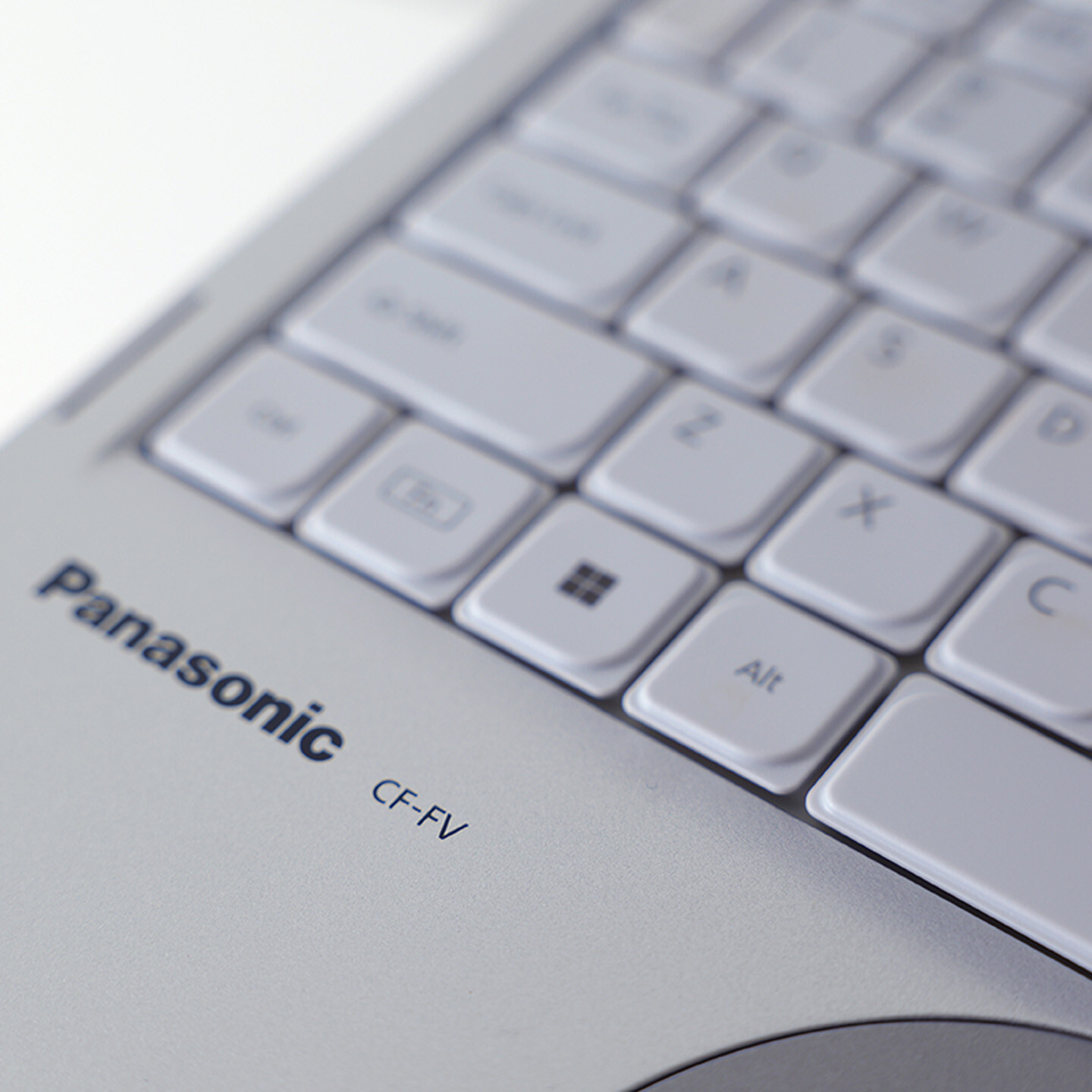
The FV4 looks like it fell through from 2003, and reviewers have said so repeatedly. The bezels are thick, the lid is a plain ribbed silver, the corners are square, and the whole thing is unmistakably a tool rather than an object. Nobody is going to steal it from a conference room, which is a genuine security feature that no spec sheet lists.
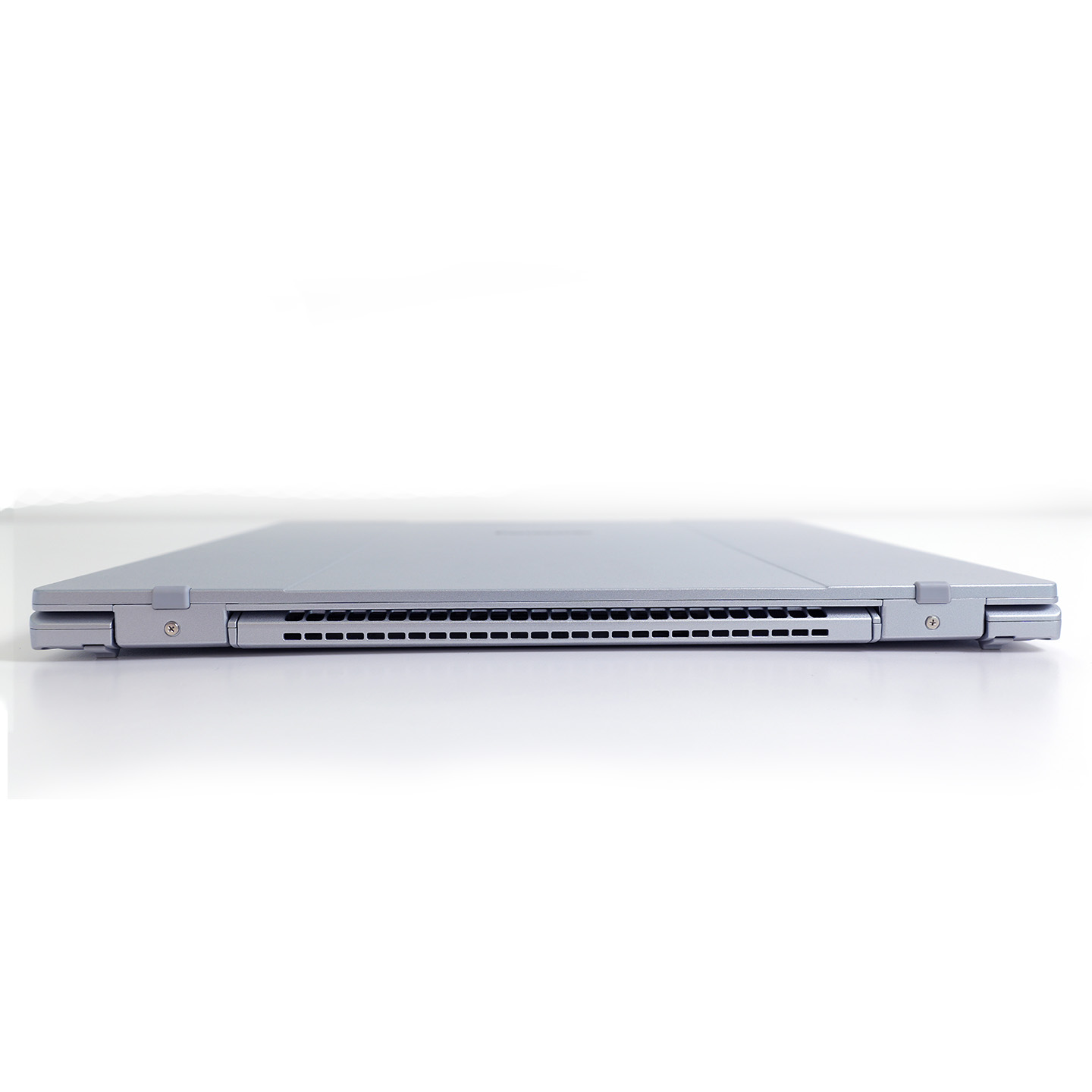
Pick it up and the retro impression dissolves. At 2.4 lb it is lighter than almost anything with this screen size, and the magnesium shell is thin enough that first time users often describe it as feeling hollow or toy like. It is not. That is what a magnesium alloy panel feels like when there is no unnecessary mass in it.
Three details are worth calling out because you will not find them elsewhere:
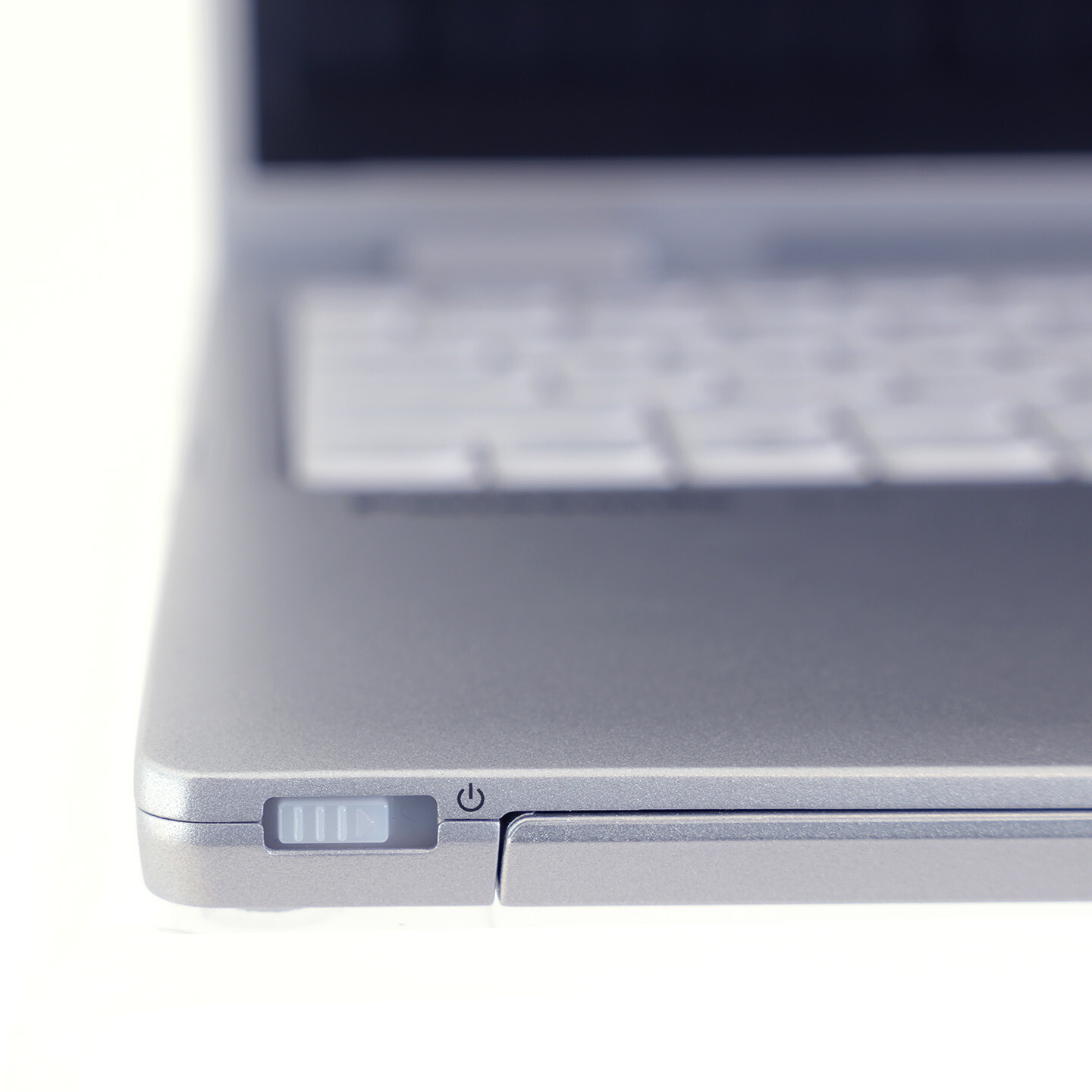
- The power switch is a slider on the front edge. Not a key, not a fingerprint button. You can wake the machine without opening it, and you cannot power it off by fat fingering the top right of the keyboard.
- There are rubber stoppers on the top corners of the lid. They hold the screen off the keyboard when it is closed. Anyone who has worn keyboard oil marks into a laptop display will appreciate this more than it sounds.
- The rear feet flip out. They give the deck a slight typing incline. It is a small thing that makes a real difference across a full day.
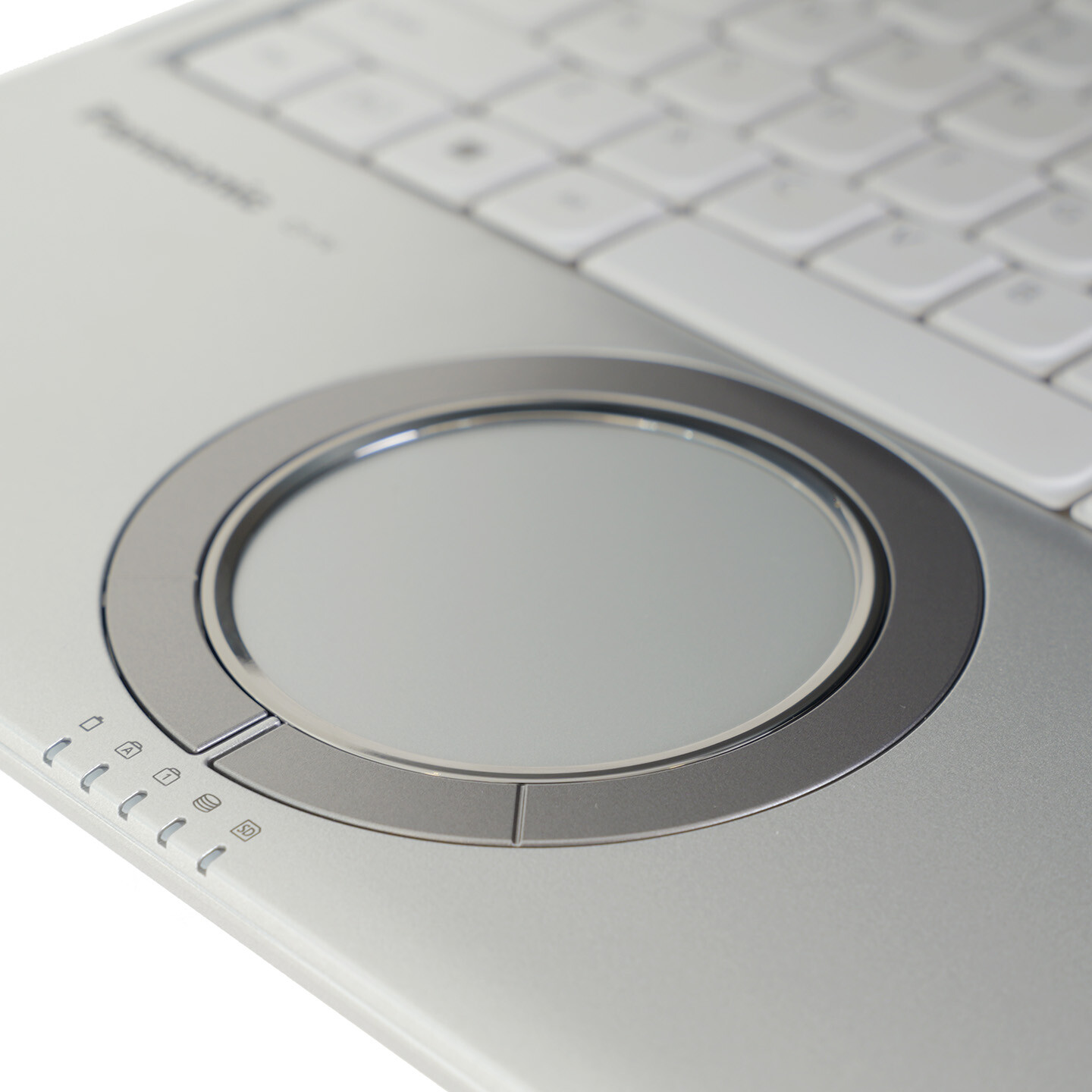
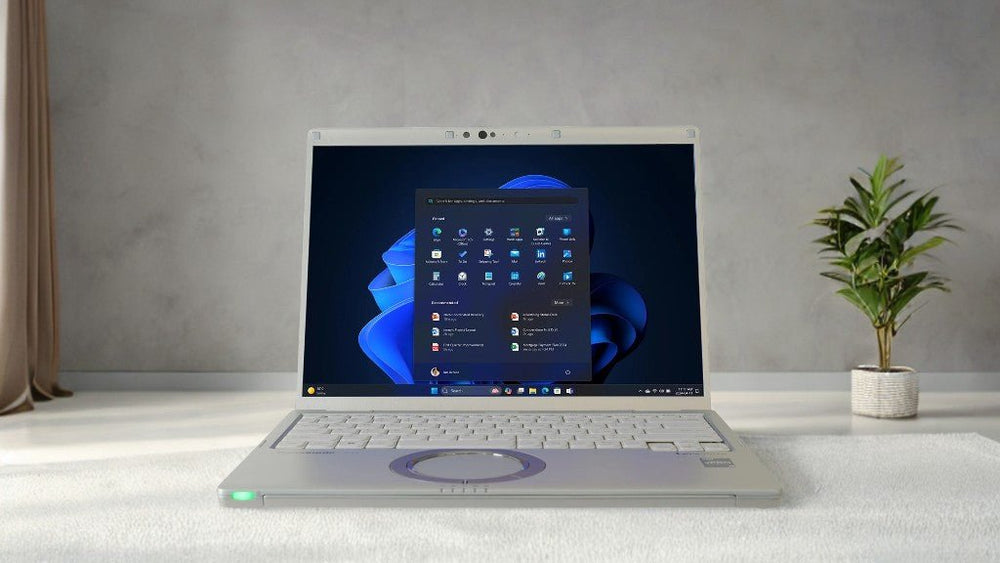
The circular wheel touchpad is the part everyone photographs. It is a round pad with an outer scroll ring, so you scroll by drawing a circle with one finger. Once it clicks with you it is fast and precise for long documents. Be honest with your users though, reviews on it are genuinely split. Several reviewers found the surface texture rough, the pad small for multi finger gestures, and the lack of a physical click awkward. If you are deploying a fleet, order one unit first and let a couple of people live with it for a week before you commit.

Image from PCmag
The 3:2 display is the reason to buy it
A 14 inch 3:2 panel at 2160 x 1440 gives you noticeably more vertical space than a 14 inch 16:9 panel does. More rows of a spreadsheet, more of a contract, more of a code file, fewer scroll actions per hour. It is the same reasoning behind the Surface Laptop's aspect ratio, and if your people live in documents it is a real productivity difference rather than a spec sheet talking point. If you want the background on how these resolutions compare, we broke it down in our guide to WUXGA and business display resolutions.
The panel is matte, which is the right call for a laptop that will sit under office fluorescents and in window seats. Panasonic rates it at 350 nits. Multiple reviewers who measured or simply used it noted it looks brighter than that number suggests, which is what a good anti reflective matte coating does: it is not raw brightness that makes a screen readable, it is brightness relative to what is reflecting off it.
Two limits to know. It is not a touchscreen, and there is no OLED or higher brightness option. Colours are accurate and well saturated but they do not pop the way an OLED does. For spreadsheets, forms, dispatch software and video calls, none of that matters. For colour critical creative work, it is the wrong machine.
Coming from a 16:9 fleet? The FV4's screen is 14 inches diagonal but the usable width is narrower than a 14 inch widescreen. Users who work in wide dashboards side by side sometimes find that the trade goes the wrong way for them. Users who work in documents almost never do. Match the aspect ratio to the software, not to the diagonal.
Ports: the no dongle laptop
This is the FV4's clearest advantage over every other 2.4 lb laptop on the market. Left side: HDMI, two Thunderbolt 4 USB-C, headphone jack, one USB-A, and the DC barrel jack. Right side: gigabit ethernet, two more USB-A, the card slot, VGA, and a Kensington lock slot.
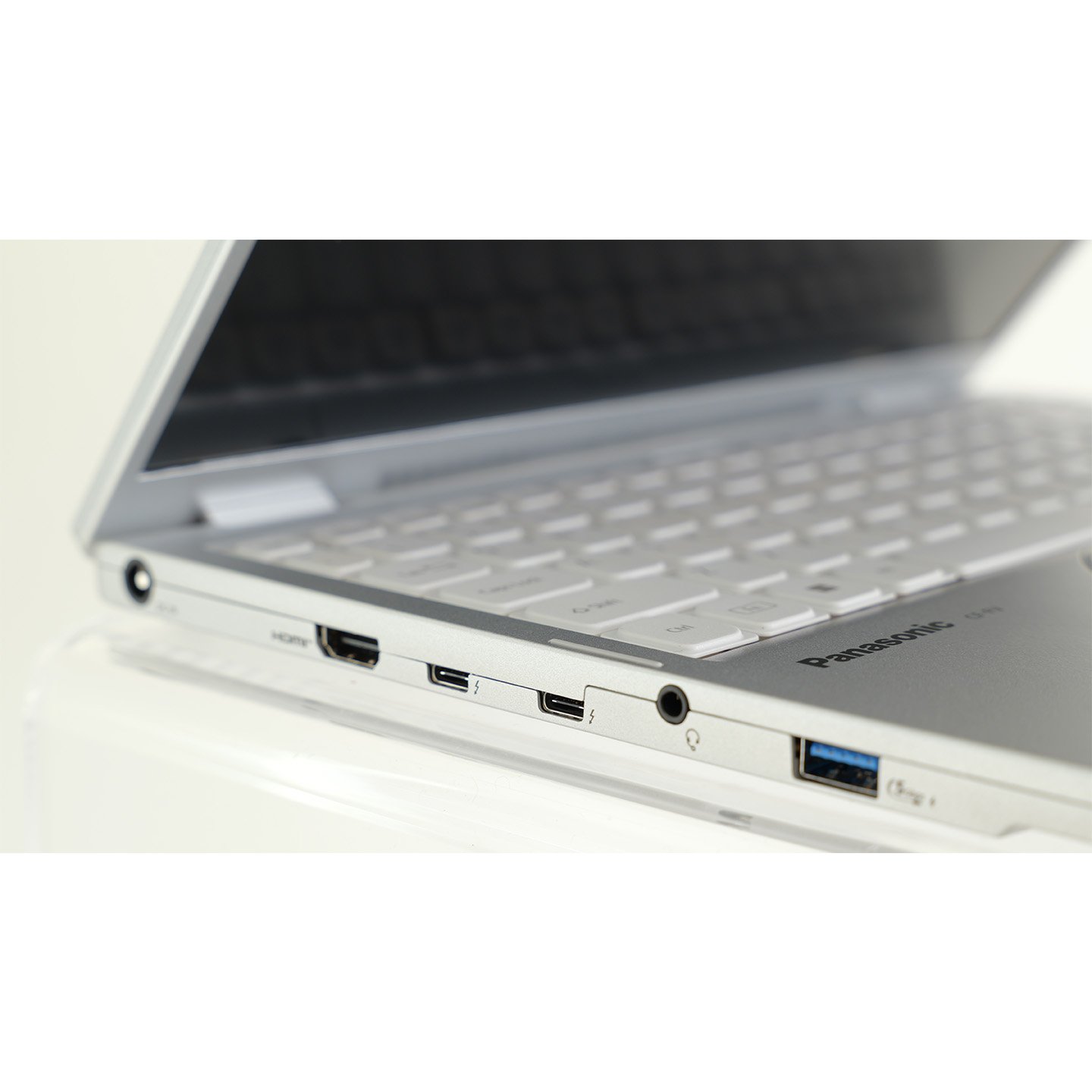
Three USB-A ports on a sub two and a half pound laptop is close to unheard of, and it matters more than it sounds when your users have wired mice, YubiKeys, badge readers and USB headsets. Real gigabit ethernet means secure networks that do not permit Wi-Fi are not a problem. VGA is there because projectors in school gyms, city council chambers and hotel conference rooms did not disappear when laptop makers stopped supporting them. It drives up to four external displays, which covers most desk setups without a dock at all.
The one catch, and it is a real one: you cannot charge the FV4 over its Thunderbolt ports. It uses a proprietary Panasonic barrel adapter, part CF-AA5713A2M. That means a USB-C dock will not power it, a phone charger will not rescue it, and the AC adapter becomes a part your asset management has to track. Order spares up front. It is the single most common thing we get called about after deployment.
Performance: fine for office work, not an AI PC
The i7-1370P is a 13th generation Intel P series chip with 6 performance cores, 8 efficient cores and 20 threads. In 2024 that was competitive. In 2026 it sits a clear generation behind Core Ultra, Ryzen AI and Snapdragon X hardware, and the benchmarks say so plainly.
| Test | Let's note FV4 (i7-1370P) |
HP OmniBook Ultra (Ryzen AI 9 HX 375) |
HP OmniBook Ultra Flip (Core Ultra 7 256V) |
|---|---|---|---|
| PCMark 10 (AC) | 5,478 | 7,723 | 6,724 |
| Geekbench 6, single core | 2,464 | 2,842 | 2,735 |
| Geekbench 6, multi core | 10,718 | 15,030 | 11,064 |
| Cinebench 2024, single | 100 | 114 | 121 |
| Cinebench 2024, multi | 406 | 965 | 532 |
| 3DMark Time Spy | 1,580 | 3,863 | 4,160 |
| CrossMark, overall | 1,737 | 1,825 | 1,843 |
Independent benchmark results published by XDA Developers on retail hardware. Comparison systems are current generation thin and light laptops, not direct competitors on price or compliance.
Read that table carefully before you draw the wrong conclusion from it. Single core performance and CrossMark, the two numbers that actually track how a machine feels in Office, Chrome and line of business software, are within a few percent of hardware two generations newer. Where the FV4 falls behind is sustained multi core rendering and graphics, and those are workloads it was never bought for.
What that means in practice: dozens of browser tabs, Teams, Outlook, Excel with real workbooks in it, ERP and CRM clients, PDF markup, and video calls with background blur are all comfortable. Video editing, 3D, local AI models and anything that wants a discrete GPU are not. There is no NPU worth naming here, so if your organisation is planning around on device Copilot features, this is not the platform to plan around.
Fan noise is low and, more usefully, low pitched. Reviewers consistently describe it as one of the quieter machines in this class, which is not nothing in an open office.
Battery life and the part almost nobody else offers
Panasonic rates the FV4 at up to 10 hours from its 55 Wh pack, measured with MobileMark 25 at 250 nits. That is a realistic office claim rather than an inflated one, and reviewers running normal mixed workloads landed close to it. In a lighter local video rundown at 30 percent brightness with radios off, XDA measured close to 17 hours, which tells you the panel and the P series chip both scale down well when you let them.

The number that matters more is this: the battery comes out. Two sliders on the underside and it is in your hand, no tools, no service call, no shipping the machine anywhere. Spare packs are part CF-VZSU2BU.
On almost every other thin business laptop, a degraded battery at year three is a repair ticket or the beginning of a refresh conversation. On the FV4 it is a twenty second swap. If you are building a total cost of ownership case, that single design decision is what stretches this from a three year asset to a five year one, and it is the same logic that makes older Panasonic hardware worth refurbishing at all. Our guide to what a refurbished laptop actually is covers how much of a machine's real lifespan comes down to serviceable parts.
Fleet tip: buy one spare battery per five to eight units rather than one per machine. Batteries age on the shelf as well as in service, so a small shared pool you rotate through is cheaper and healthier than a spare sitting in a drawer for four years.
How tough is it, honestly?
This is where we have to be blunter than the marketing copy, including our own earlier version of this review. The FV4 is a durable laptop. It is not a rugged one, and the difference is not marketing.

Panasonic's published structural claims are a 30 inch drop resistance and a magnesium alloy chassis. There is no IP rating, no MIL-STD-810 test report, no sealed keyboard, no port covers. Compare that with a fully rugged Toughbook, which carries an IP65 seal and a MIL-STD-810H test suite that includes drops from four feet and higher, vibration, humidity, altitude and thermal shock. Those are different categories of product with different price tags for a reason. If the phrase "military grade" is in your requirements document, read our explainer on what a military grade laptop actually means before you shortlist anything.
The operating temperature range deserves its own paragraph because it catches Canadian buyers out constantly. The FV4 is rated for 41 to 95 F, which is 5 to 35 C. That is an office range. A truck cab in a Southern Ontario January is well below the bottom of it, and a closed vehicle in August is above the top. If devices live in vehicles, this is the wrong machine and you want something from the Toughbook line instead. We wrote a full breakdown of what temperatures rugged laptops can actually handle if you need the comparison in detail.
What the FV4's durability does buy you is survival of the ordinary. A slide off a desk. A bag dropped on a train platform. Being carried by the lid corner by someone in a hurry. A bookcase of files landing on the closed lid. For the office worker who moves between three buildings a day, that is the failure mode that actually happens, and the FV4 is built for it while a 2.4 lb consumer ultrabook is not. Our piece on rugged versus consumer laptops covers where each line sits.
Security and compliance: the actual reason it gets bought
For a lot of buyers the FV4 wins or loses on this section alone, before anyone looks at a benchmark.
- Secured-core PC. Microsoft's highest hardware security tier, combining firmware protection, virtualisation based security and identity protection enabled out of the box.
- Intel vPro with Hardware Shield. Out of band management and below the OS attack protection, which is what makes remote remediation of a locked or unbootable machine possible.
- TPM 2.0 and an OPAL self encrypting SSD. Hardware encryption at the drive level rather than software only.
- NIST BIOS compliant, with Absolute Persistence built into the BIOS. Absolute survives a drive wipe and an OS reinstall, which is the whole point of it for a stolen asset.
- Local Platform Erase. A verifiable end of life wipe, which matters if your disposal chain has to produce evidence.
- TAA compliant. This is the gate for US federal procurement, and it rules a lot of otherwise capable laptops out entirely.
Panasonic also sells the services layer around this: custom BIOS with your logo and settings, imaged software stacks, asset tagging and staged delivery. We do the same work here for customers who would rather receive machines ready to hand out, which is what our deployment services and enterprise programme exist for.
What we would change
An honest list, because you will hit all of these:
- No backlit keyboard. On a laptop aimed at people who work on planes, in hotel rooms and in dim conference rooms, this is the hardest omission to defend. Reviewers flag it every time.
- 512GB is the ceiling. At this price bracket a 1TB option should exist. It does not.
- Soldered memory. 32GB is generous today and it is also permanent. There is no upgrade path.
- No charging over Thunderbolt. The proprietary barrel adapter is the FV4's most frustrating quirk in daily use.
- No WWAN or LTE option. If your users need connectivity away from Wi-Fi, plan on tethering or a hotspot.
- The wheel touchpad divides people. Some users love it inside a day. Others never get comfortable. Trial it before a fleet order.
- The front edge LEDs blink in your peripheral vision. A small thing, but reviewers noticed and so will your users.
Let's note FV4 vs Panasonic Toughbook: which one do you actually need?
This is the comparison we get asked for most, because both machines have a Panasonic badge and buyers assume they are on the same spectrum. They are not.
| Let's note FV4 | Toughbook 55 / 56 (semi rugged) | Toughbook 40 (fully rugged) | |
|---|---|---|---|
| Weight | 2.4 lb | About 4.4 lb and up | About 7.4 lb |
| Drop rating | 30 in | 3 ft | 6 ft |
| Sealing | None rated | IP53 | IP66 |
| MIL-STD-810 | Not claimed | Yes | Yes |
| Operating temperature | 41 to 95 F | Wider, verify by model | Wide, including sub zero |
| Screen | 14 in, 3:2, 2160 x 1440, 350 nits | 14 in widescreen, high brightness options | 14 in, sunlight readable, touch |
| Modularity | Battery only | Swappable drive, expansion bays | Extensive, including xPAK expansion |
| Best for | Commuting office and government staff | Field service, in and out of vehicles | Public safety, utilities, harsh sites |
The short version: if the laptop lives in buildings and travels in a bag, the FV4 is lighter, cheaper and better to work on. If the laptop lives in a vehicle, gets rained on, or goes on a site, buy a Toughbook. Our Toughbook 56 review covers the semi rugged option in the same detail, and you can line the whole range up against each other with our rugged computer comparison tool.
What about the FV5 and the FC6?
You will find references to a Let's note CF-FV5 and a CF-FC6 online, and they are real. They are Japanese domestic models. The FV5 moved to Intel Core Ultra processors and LPDDR5X memory, and notably dropped the 3:2 panel for a 16:10 WUXGA screen at a lower resolution. The FC6 followed on Core Ultra Series 2.
As of this update, none of them are sold in North America. Panasonic Connect's North American Let's note catalogue lists the FV4 and only the FV4. If you buy a Let's note here, you are buying an FV4, and if you specifically want the 3:2 QHD panel, the FV4 is the model that has it. Grey market Japanese units exist but come with a Japanese keyboard layout, Japanese Windows licensing and no North American warranty coverage, which is rarely worth the trouble for a business deployment.
On the ex-Japan keyboard layout: earlier coverage of the FV4, including our own, described an unusual key arrangement carried over from the Japanese market. The North American FV4 ships a standard 84 key US English layout. If you are reading older reviews, check whether the unit tested was a Japanese domestic model before you factor that into a decision.
Who should buy the FV4, and who should not
Buy one if your people carry a laptop between buildings all day and every ounce shows. Buy one if you need TAA compliance or secured-core certification to clear procurement. Buy one if your users still plug into projectors, wired networks or USB peripherals and you are tired of buying dongles. Buy one if a swappable battery changes your refresh maths. Buy one if your work lives in documents and spreadsheets, where the 3:2 screen pays back every day.
Skip it if the machine will live in a vehicle or outdoors, where the temperature range and the lack of sealing will bite you. Skip it if you need more than 512GB of internal storage or any memory upgrade path. Skip it if your users type in the dark, because there is no backlight. Skip it if you need LTE, a touchscreen, or discrete graphics. And skip it if raw multi core throughput is the point, because a current Core Ultra or Ryzen AI machine will cost less and finish sooner.
Not sure the FV4 is the right fit?
Tell us where the laptops will actually live, what software they have to run and what your procurement rules require. We will tell you honestly whether the FV4 is right or whether a Toughbook is the better spend, including when the cheaper answer is the correct one. We stock the FV4 new, we configure and image before shipping, and we have shipped to more than 25,000 customers across six continents since 2016. Request a quote and we will get right back to you.
Shop the Let's note FV4
Frequently asked questions
Is the Panasonic Let's note FV4 a Toughbook?
No. Both are made by Panasonic, but Let's note is the business laptop line and Toughbook is the rugged line. The FV4 is rated for a 30 inch drop with a magnesium alloy chassis. It has no IP rating and Panasonic does not claim MIL-STD-810 testing for it. A Toughbook does have both.
How much does the Let's note FV4 weigh?
2.4 lb, which is about 1.09 kg, with the standard battery installed. Its dimensions are 12.1 by 9.2 by 0.7 inches.
Does the Let's note FV4 have a backlit keyboard?
No. The 84 key US English keyboard is not backlit. It is the most frequently criticised omission on the machine and there is no configuration option that adds it.
Can you charge the FV4 over USB-C?
No. Despite having two Thunderbolt 4 ports with Power Delivery for peripherals and displays, the FV4 charges only through its proprietary DC barrel jack using the Panasonic CF-AA5713A2M adapter. Keep the charger with the machine and order spares for a fleet.
Is the Let's note FV4 battery replaceable?
Yes, by the user, with no tools. Two sliders on the underside release the pack. The spare battery part number is CF-VZSU2BU. This is one of the FV4's genuine advantages over almost every other laptop in its weight class.
What processor does the Let's note FV4 have?
An Intel Core i7-1370P vPro, a 13th generation P series chip with 6 performance cores, 8 efficient cores and 20 threads, paired with integrated Intel Iris Xe graphics. North America gets this one configuration only.
Can you upgrade the RAM or SSD in the FV4?
The 32GB of LPDDR4x memory is soldered and cannot be upgraded. The 512GB OPAL SSD is the only storage capacity offered in North America, so plan for external or cloud storage if 512GB is tight for your users.
How long does the Let's note FV4 battery last?
Panasonic rates it at up to 10 hours using MobileMark 25 at 250 nits, and reviewers running normal office workloads reported figures close to that. In a lighter local video playback test at 30 percent brightness with Wi-Fi and Bluetooth off, XDA measured close to 17 hours.
Is the Let's note FV4 touchscreen?
No. The 14 inch 2160 x 1440 display is a matte, non touch IPS panel. There is no touch or pen option, and no OLED option.
Does the FV4 have LTE or 5G?
No. There is no WWAN option. Connectivity is Wi-Fi 6E, Bluetooth 5.3 and gigabit ethernet. Users who need cellular will have to tether or carry a hotspot.
Is the Let's note FV4 TAA compliant?
Yes. It is Trade Agreements Act compliant and is also certified as a Microsoft secured-core PC, which is why it appears on government and regulated procurement shortlists.
What is the circular touchpad on the FV4 for?
It is Panasonic's wheel pad, a long standing Let's note design. The outer ring works as a scroll wheel, so you scroll a document by tracing a circle with one finger. Left and right click are performed through the ring. Opinion on it is genuinely divided, so trial one unit before ordering a fleet.
What temperature can the Let's note FV4 operate in?
41 to 95 F, or 5 to 35 C, with a storage range of -4 to 140 F. That is an indoor range. If devices will be left in vehicles through a Canadian winter or a hot summer, a Toughbook is the correct product rather than the FV4.
Is there a newer model than the FV4?
In Japan, yes. Panasonic has released the CF-FV5 on Intel Core Ultra and the CF-FC6 on Core Ultra Series 2. Neither is sold in North America. Panasonic Connect's North American Let's note range currently consists of the FV4 alone, and the FV5 also traded the 3:2 QHD panel for a 16:10 WUXGA one.
What warranty does the Let's note FV4 come with?
A 3 year limited warranty covering parts and labour, which is longer than the one year most business laptops ship with. Details of what we cover on hardware bought from us are on our warranty page.
The bottom line
The Let's note FV4 is a specialist tool that happens to look like a generalist laptop, and that is why it confuses people. Judged as a 2026 thin and light, it is expensive, a generation behind on silicon, capped at 512GB, and missing a keyboard backlight. Judged as what it actually is, a compliance ready, endlessly portable, port complete machine with a battery you can swap in twenty seconds, there is very little else like it.
The buyers who love it are the ones who already know what they need: government and regulated organisations that need TAA and secured-core, IT teams tired of dongle budgets, and staff who carry a laptop between buildings all day and feel every ounce. The buyers who regret it are the ones who read "Panasonic" and "magnesium alloy" and assumed they were getting Toughbook durability. They are not. A 30 inch drop rating and a 41 to 95 F operating range are the two numbers that define this machine's boundaries, and being clear about them up front is the difference between a five year asset and a warranty conversation.
Get the fit right and it is one of the most quietly satisfying business laptops on the market.
Sources and further reading
- Panasonic Connect North America, Let's note FV4 product page, for the North American configuration and current availability.
- Panasonic Let's note FV4 spec sheet, for structural performance, operating temperature, battery, port list, security features and part numbers.
- XDA Developers, Panasonic Let's Note FV4 review, for independent benchmark results, battery rundown testing and port layout.
- Techaeris, Panasonic Let's Note FV4 review, for hands on notes on the keyboard, wheel pad, display and design details.
- Notebookcheck, Panasonic Let's Note FV4, for aggregated specifications and review scoring.
- Panasonic Connect, Let's note FV4 US launch announcement, for launch date and positioning.
Rugged Books Inc. has supplied, configured and supported business and rugged computers worldwide since 2016 from Niagara-on-the-Lake, Ontario. We hold R2v3, ISO 9001:2015, ISO 14001:2015 and ISO 45001:2018 certifications. Specifications above reflect the North American configuration and are subject to change by the manufacturer.
Final Thoughts
(Credit: Rugged Books)
Panasonic Let's note FV4 Review
The FV4 is a specialist tool that looks like a generalist laptop, and that is why it confuses people. Judged as a 2026 thin and light it is expensive, a generation behind on silicon, capped at 512GB and missing a keyboard backlight. Judged as what it actually is, there is very little else like it. The buyers who love it already know what they need: government and regulated organisations that need TAA and secured-core, IT teams tired of dongle budgets, and staff who carry a laptop between three buildings a day and feel every ounce. The buyers who regret it are the ones who read Panasonic and magnesium alloy and assumed they were getting Toughbook durability. Get the fit right and it is one of the most quietly satisfying business laptops on the market.
Should I Upgrade?
If your current fleet is 16:9 widescreen and your people live in spreadsheets and documents, the 3:2 panel alone is a real daily gain and worth the move. If you are replacing machines purely because the batteries are dead, note that the FV4 is the rare laptop where that is a twenty second swap rather than a refresh cycle, which changes the maths on your next three years. But if your devices spend any part of the day in a vehicle, do not upgrade to this. Move to a Toughbook instead. The FV4's 41 to 95 F operating range and lack of sealing are hard limits, not conservative ratings.